Feature · Send and approve
Approve it,
or send it back.
Plans, designs and websites wait for your approval of the current revision. Request changes, Send answers and Approve share one send dialog, so you see what goes before it goes.
claude plugin marketplace add andreiverdes/bluedocclaude plugin install bluedoc@bluedocInside a session the same commands are /plugin marketplace add andreiverdes/bluedoc and /plugin install bluedoc@bluedoc. Start a new session to load the skill.
codex plugin marketplace add andreiverdes/bluedoccodex plugin add bluedoc@bluedocRestart Codex. Mention the skill with $bluedoc or let Codex pick it from your request. Plan mode (/plan) opens the plan as a page; the README has the sandbox lines that skip the approval prompts.
pi install git:github.com/andreiverdes/bluedocRestart pi. /bluedoc-plan-mode turns on plan mode, and the plan opens as a page for your approval.
omp plugin marketplace add andreiverdes/bluedocomp plugin install bluedoc@bluedocRun /reload-plugins in an open session, or start a new one. omp’s plan reviews open as pages: Approve runs the plan, Request changes refines it.
copilot plugin install andreiverdes/bluedocStart a new session. When Copilot leaves plan mode, its plan opens as a page and waits for your approval.
git clone https://github.com/andreiverdes/bluedoc.gitagy plugin install bluedoc/antigravityRestart agy. In plan mode (agy --mode plan or /plan), the implementation plan opens as a page for your approval.
npx skills add andreiverdes/bluedocFor any other agent that reads skills. Or clone the repository and link skills/bluedoc into your agent’s skills folder.
The send dialog
See what goes, then send it.
Your picks as chips, your comments in a timeline, then a one-line note with Attach. Text you typed but didn’t save goes too. A review’s key names its next step.
Send a plan back instead of saying no
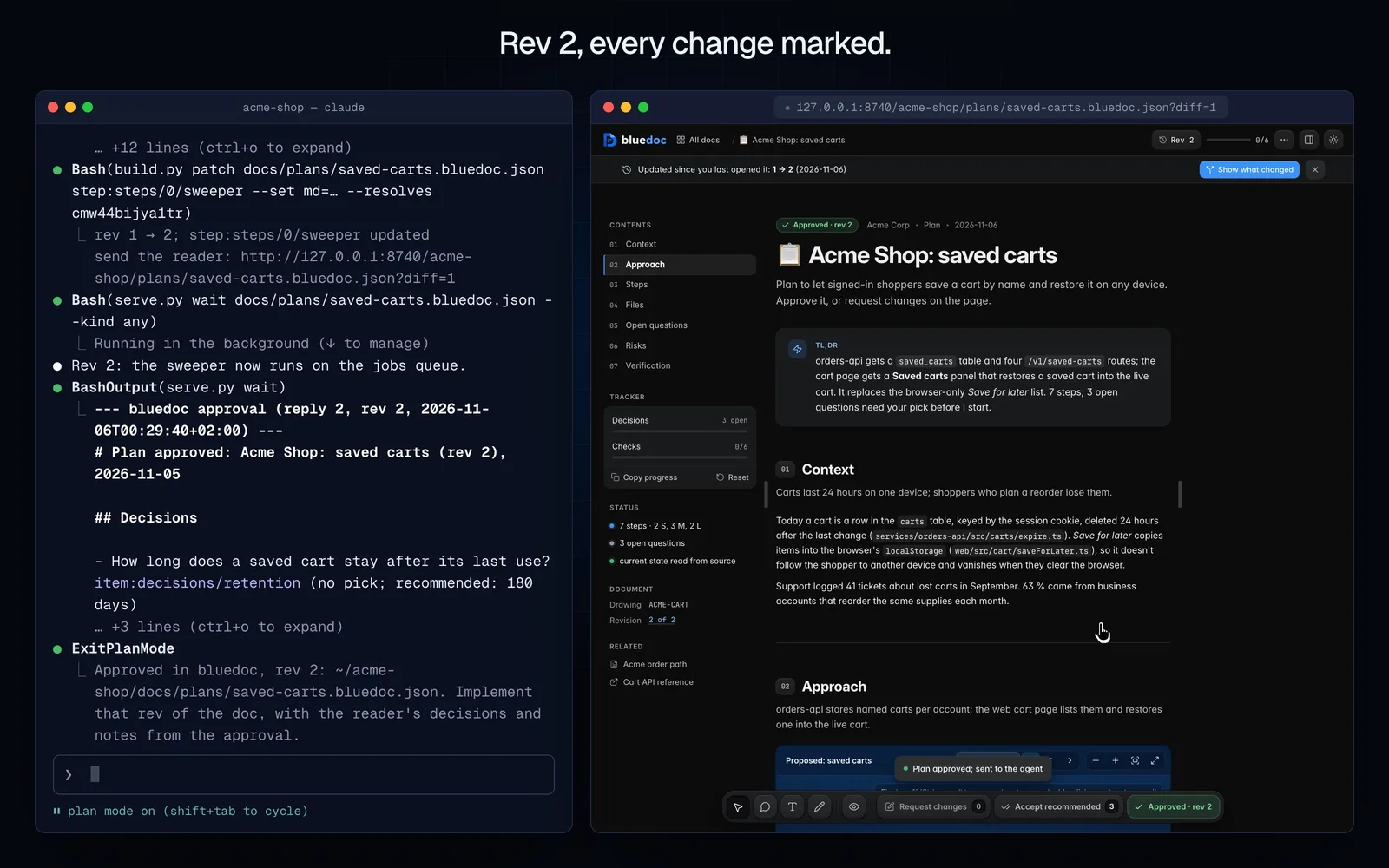
Request changes with a note. The agent patches rev 2 and resolves your note, the page marks the change word by word, and you approve that.
Send change requests to the agent
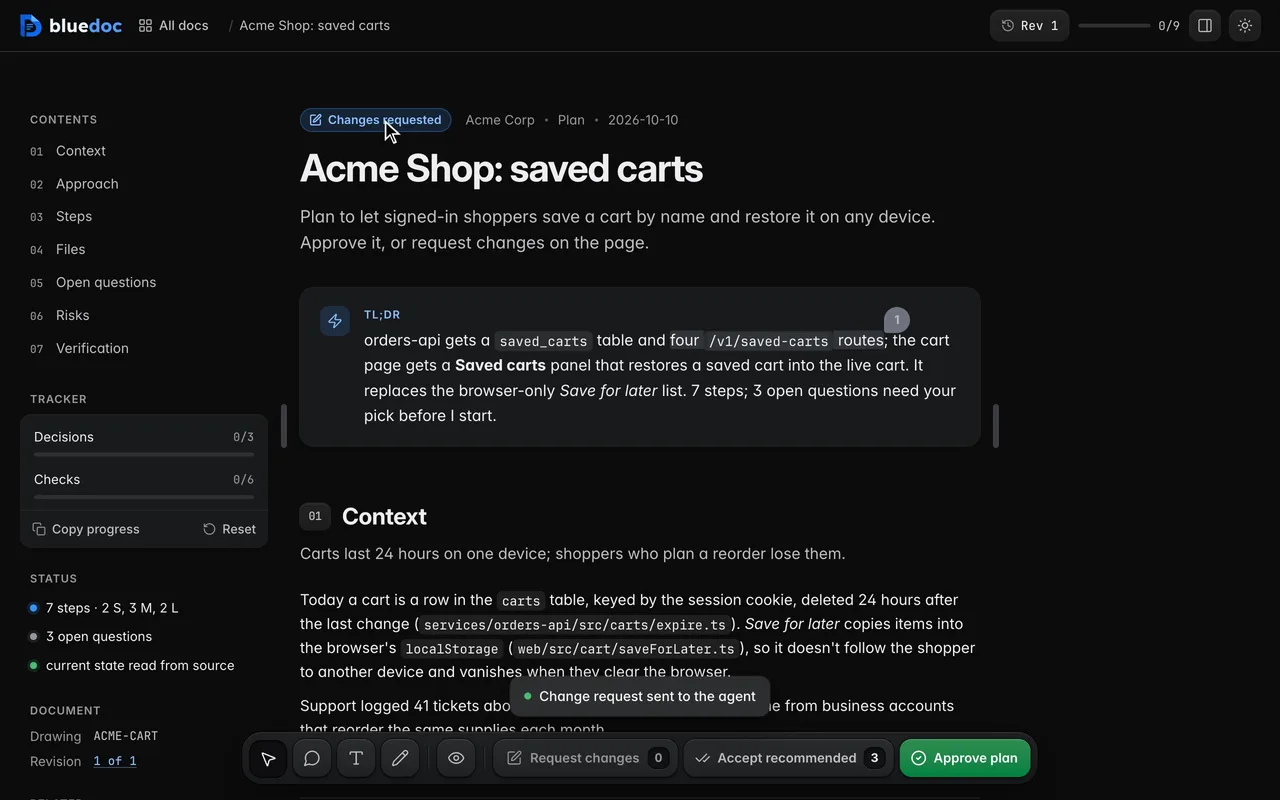
Request changes opens the send dialog: your comments in a timeline, a note, then Send hands them over in one go.
Send ticks and picks without approval
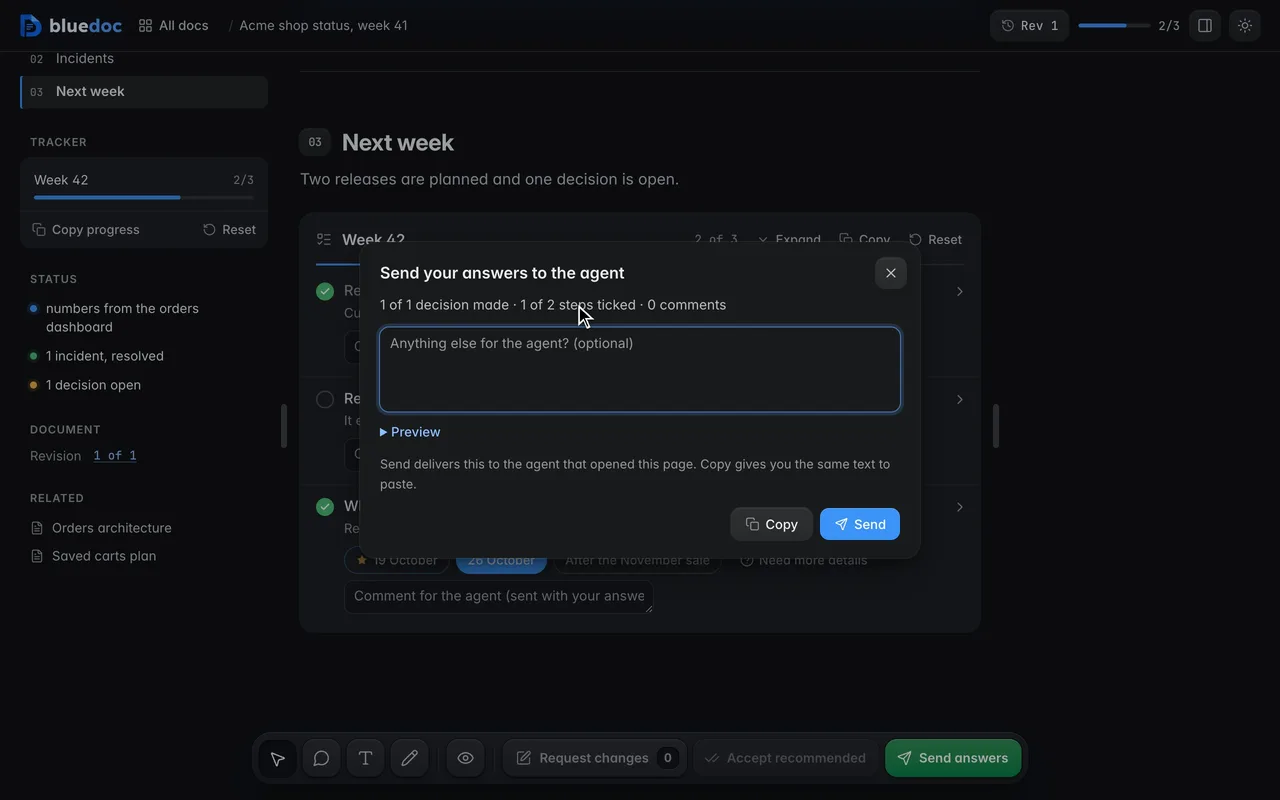
Pages with no approval step, such as a status report, send your ticks, picks and step comments with Send answers. A review’s key names its next step: Apply decisions, Post review or Reply and fix.
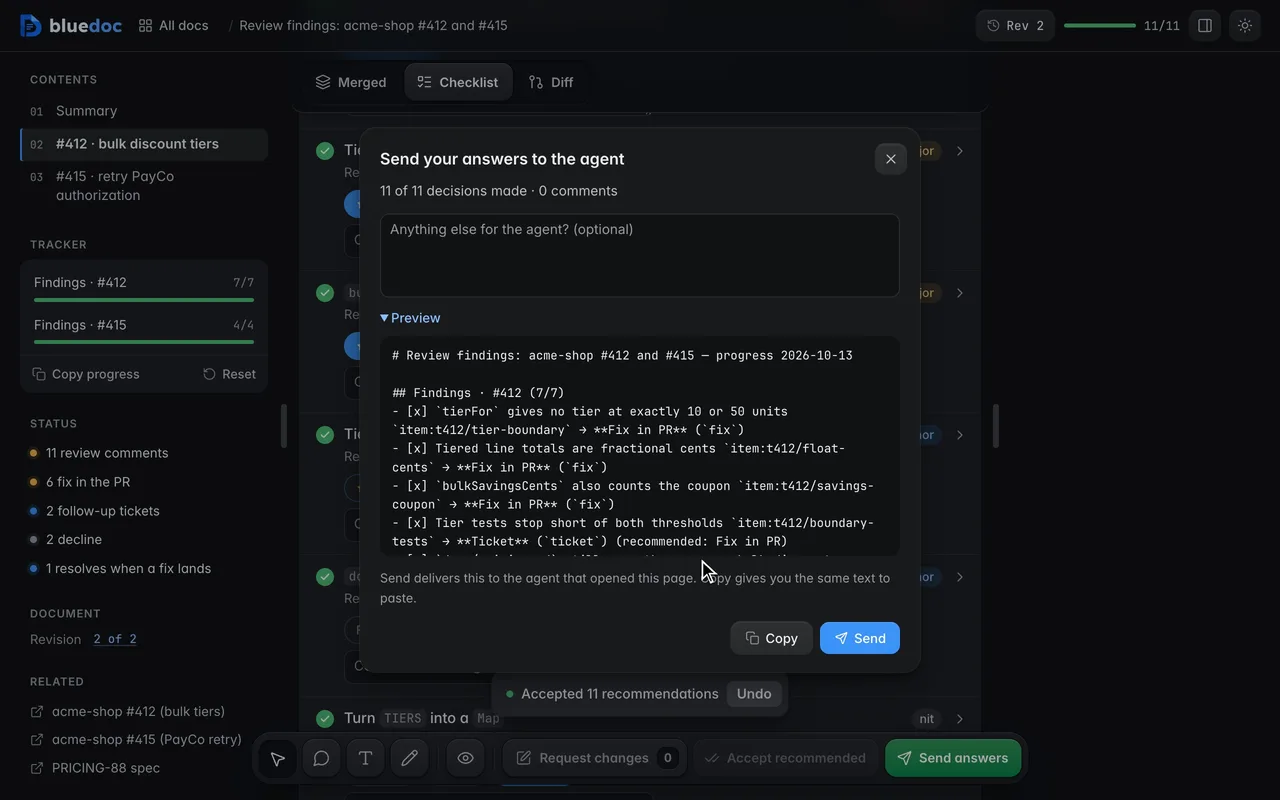
Send picks that differ from the recommendation
Accept recommended in the findings toolbar takes every starred answer; change the ones you disagree with. Reply and fix’s dialog marks each pick that differs from the agent’s.
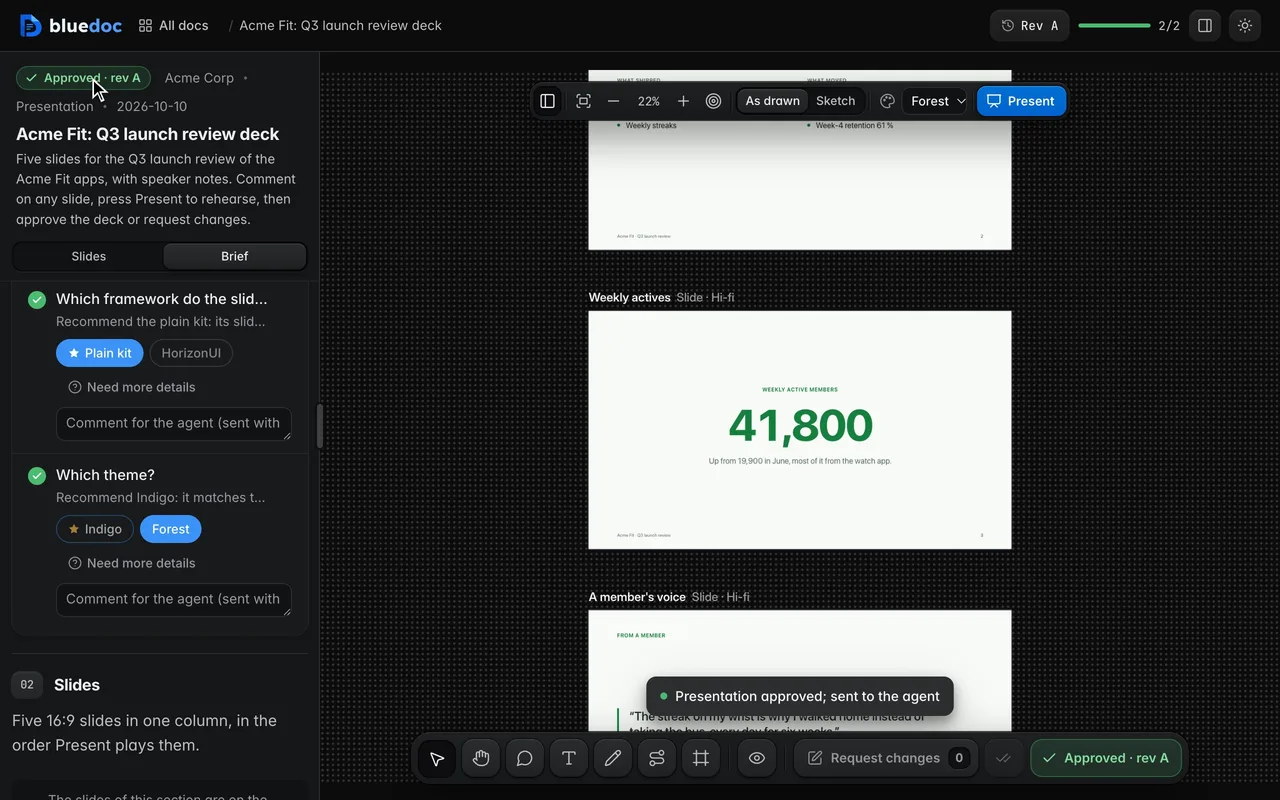
Send the deck back with your picks
A deck isn’t approved: its dock ends in Request changes and Present. Your picks and comments go to the agent with Request changes.
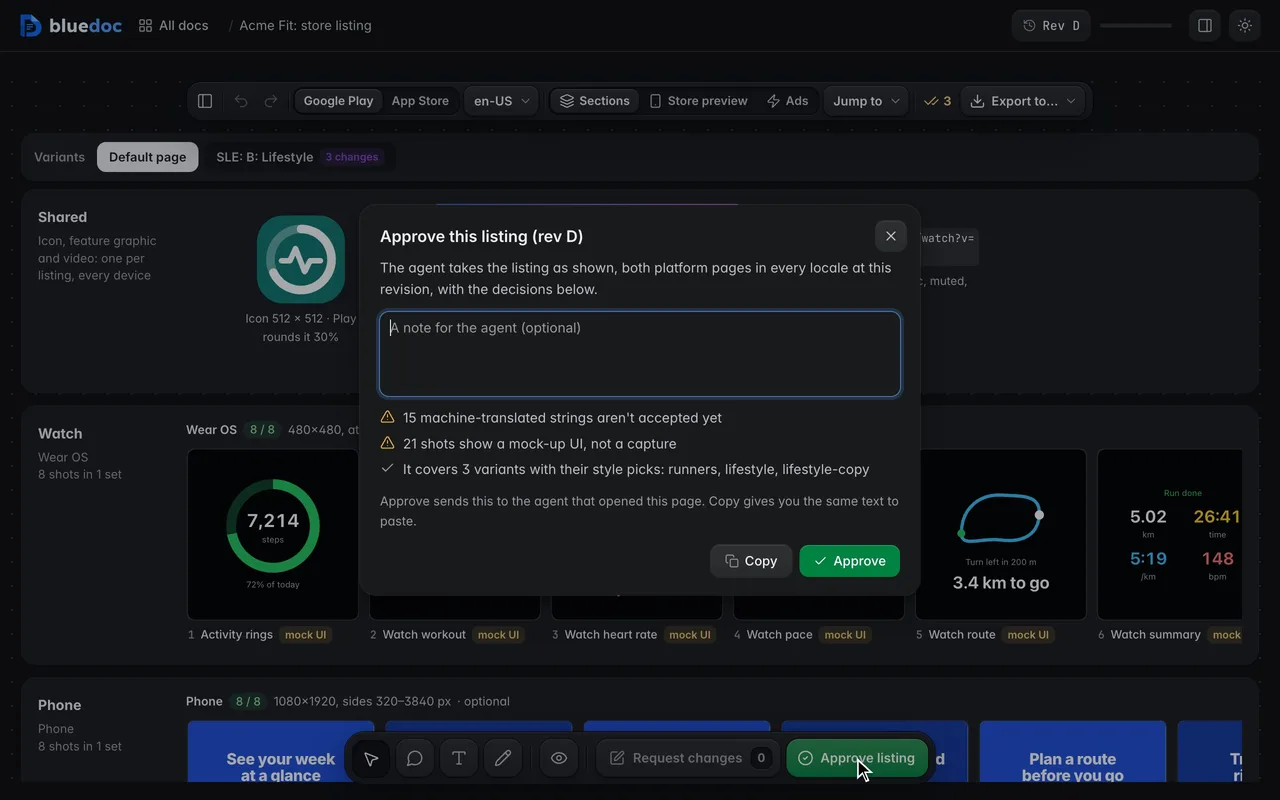
Send your drafts with Request changes
A listing isn’t approved: its drafts go to the agent with Request changes, whose dialog lists each one beside your note.
Approval
An approval belongs to one revision.
The status chip reads Awaiting approval, Changes requested, then Approved. Marking steps done keeps the approval; any other edit asks for it again.
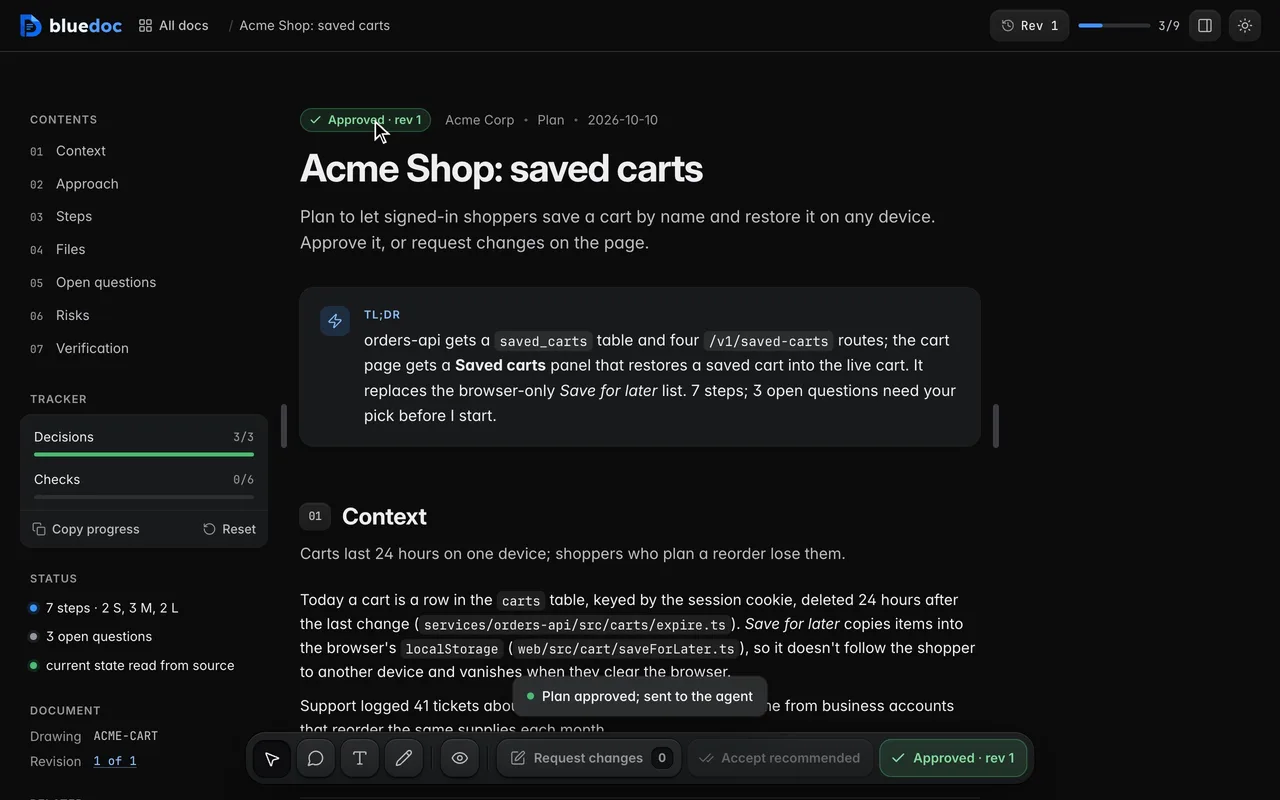
Approve the current revision
Approve opens the send dialog with your picks and a note, and records the approval against this revision. The agent waits for it.
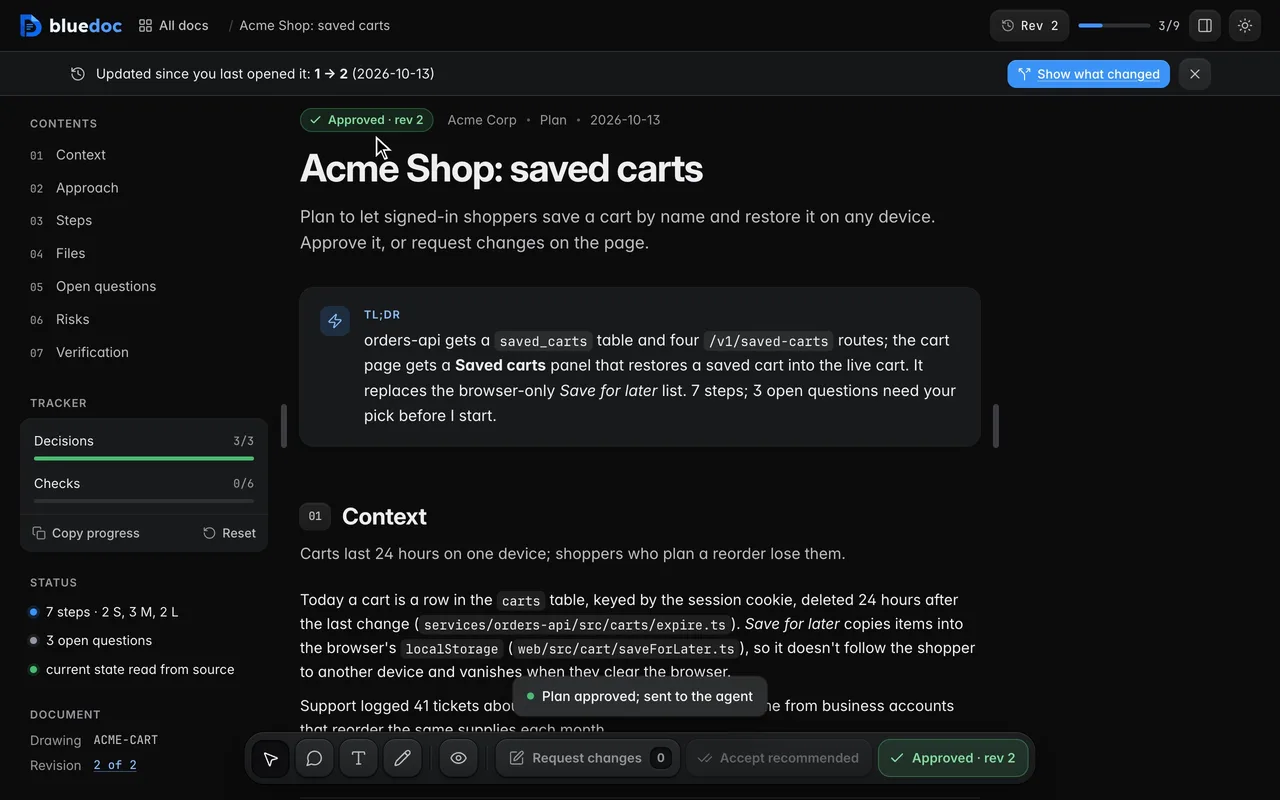
Watch the status chip follow the review
The chip at the top reads Awaiting approval, then Changes requested once you send notes, then Approved once you approve the agent’s next revision.
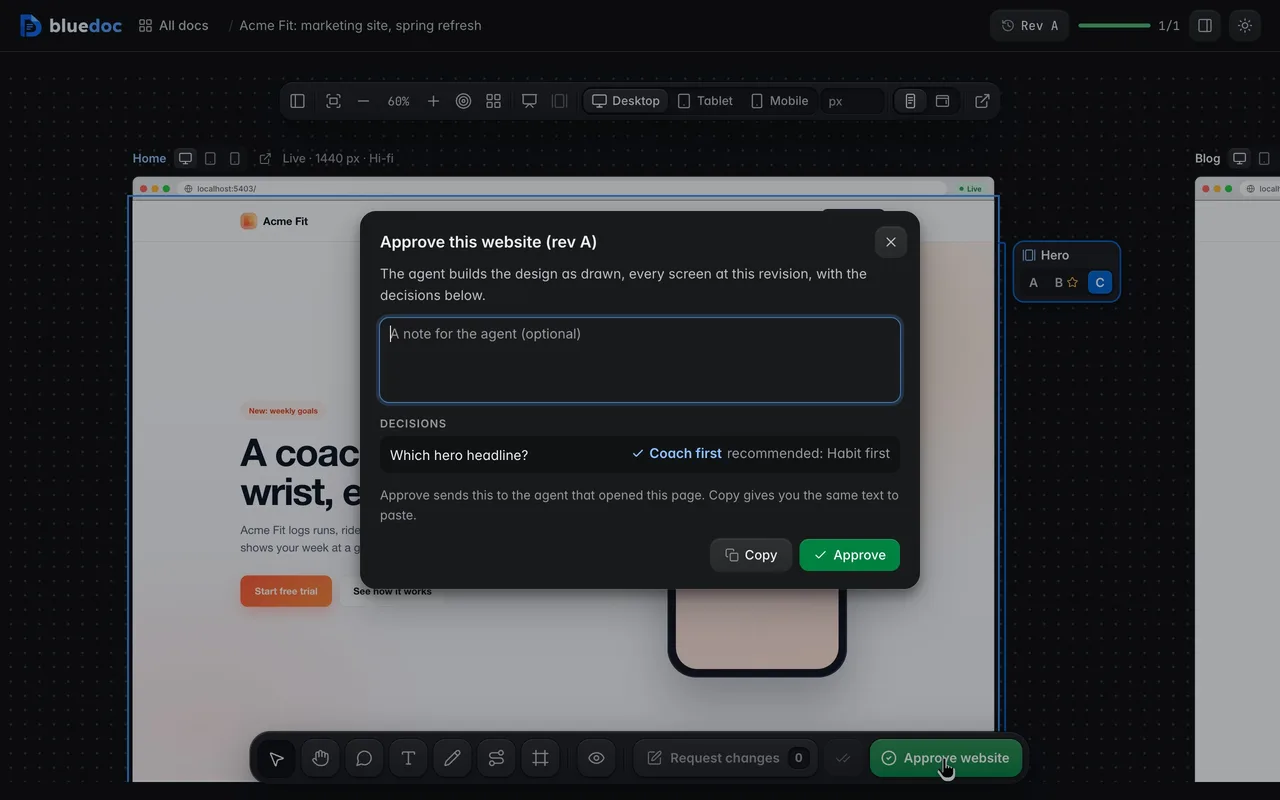
Approve the site with your picks
Approve opens the send dialog with each pick against the agent’s recommendation, and records the approval on this revision. The agent waits for it, then writes the picks into the source.
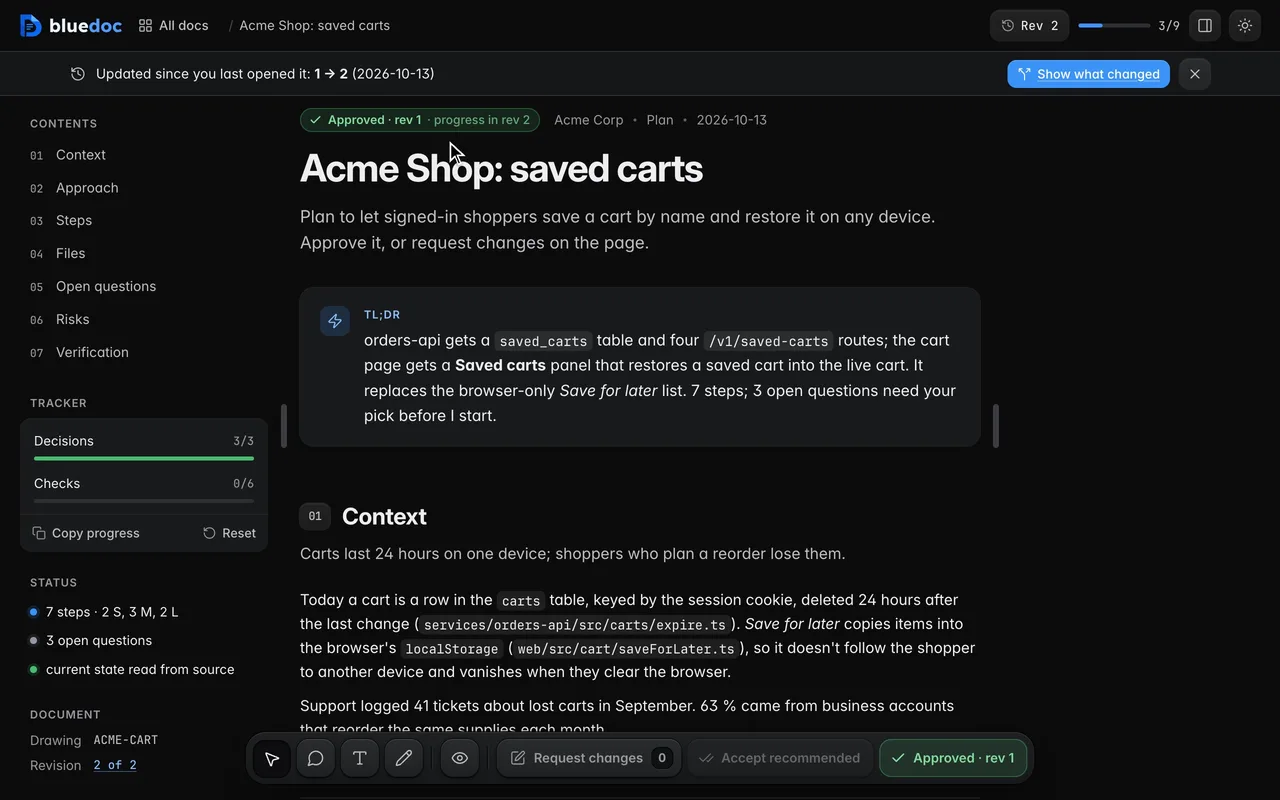
Keep an approval across progress
A revision that only marks steps done keeps the approval. Any other edit asks for approval again.
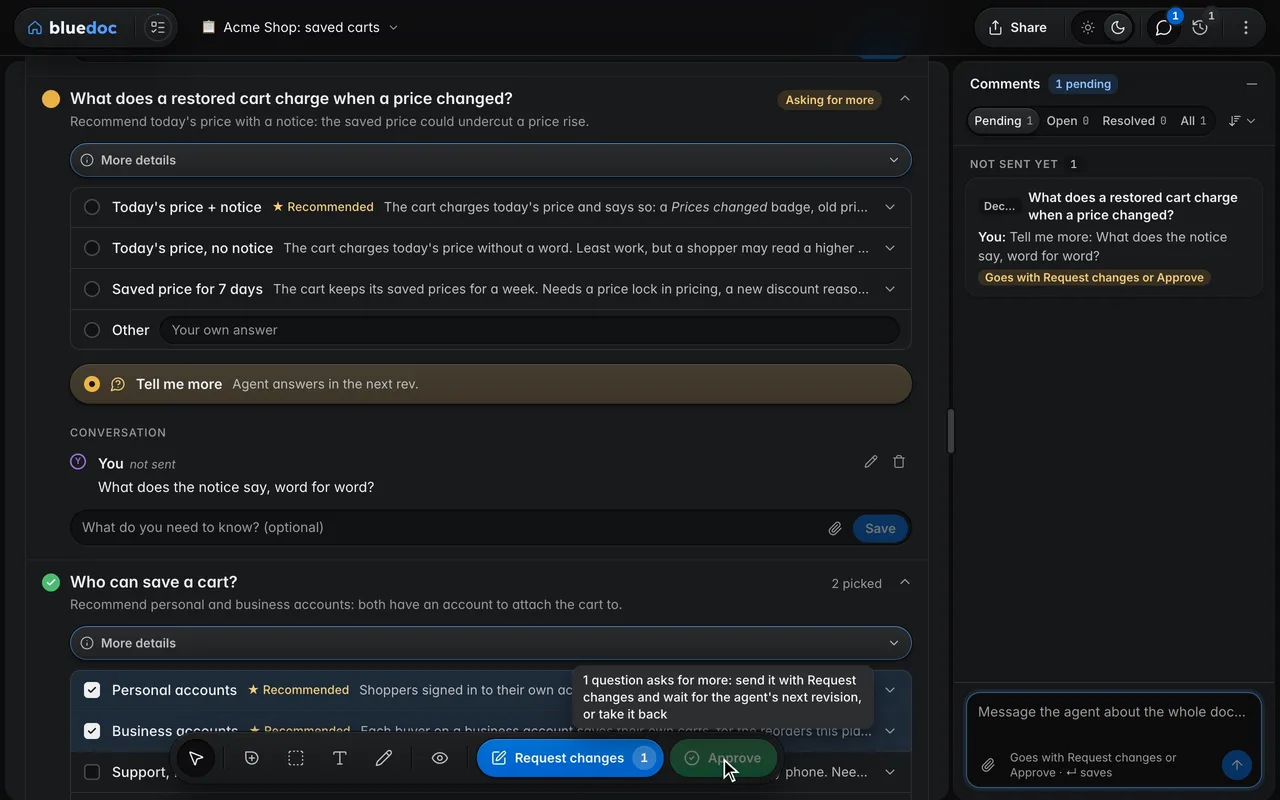
Approve once your questions are answered
While a question asks for more with Tell me more, Approve waits and says why. Send the question with Request changes; when the agent’s next revision answers it, approve.
How the agent waits
The agent waits for your send.
Then it acts on that revision.
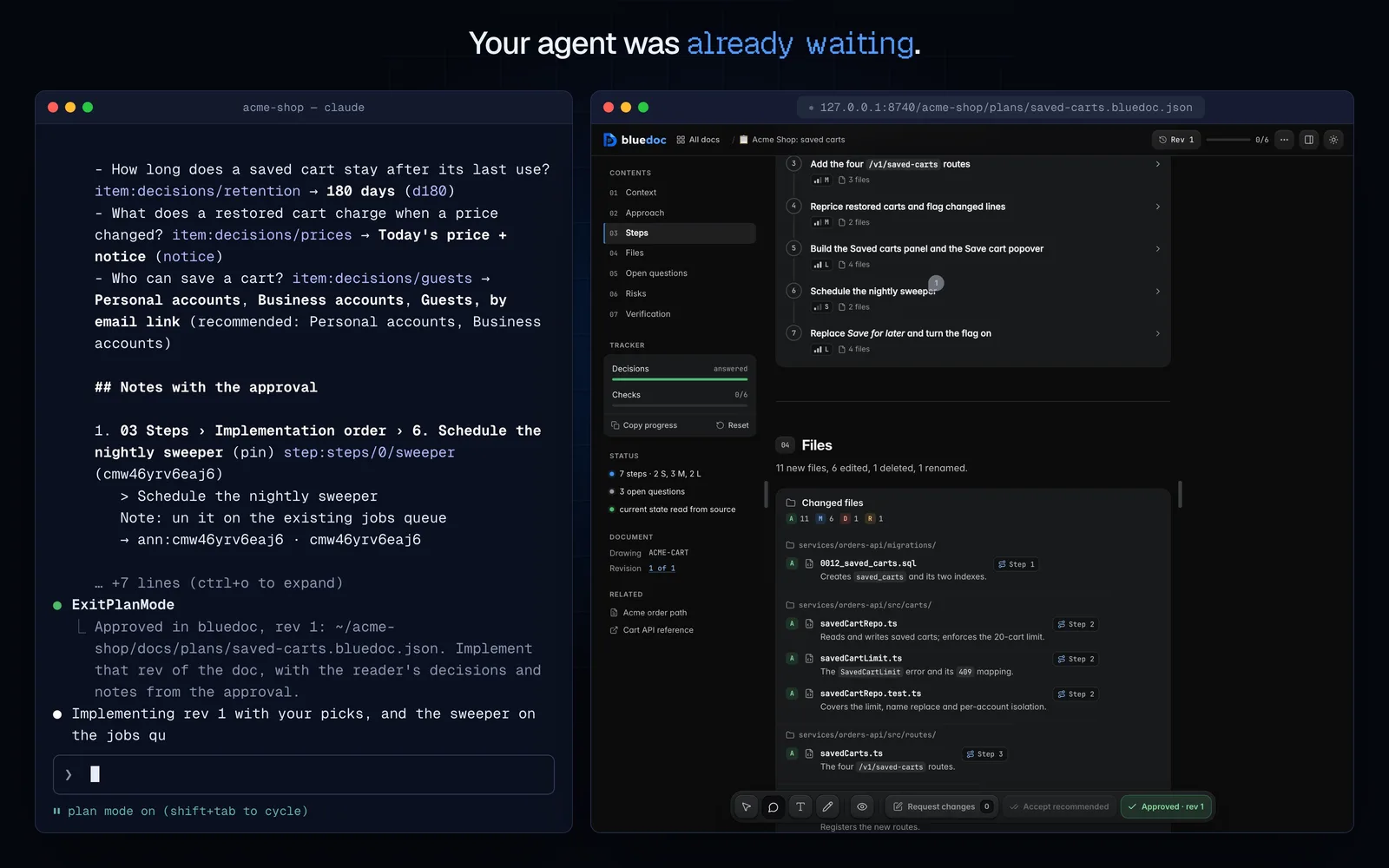
With the plugin installed, every plan Claude Code finishes in plan mode opens as a page, and Claude waits with serve.py wait. On Request changes it patches the doc into a new revision; on Approve it leaves plan mode with your decisions.
python3 <skill>/scripts/serve.py wait docs/plans/saved-carts.bluedoc.json --kind anypython3 <skill>/scripts/build.py patch docs/plans/saved-carts.bluedoc.json step:steps/0/sweeper --set "md=Runs on the existing jobs queue." --change "The sweeper runs on the jobs queue." --resolves cmgp2r8v0d3k--- bluedoc approval (reply 4, rev 1, 2026-10-12T10:41:07+00:00) ---# Plan approved: Acme Shop: saved carts (rev 1), 2026-10-12 ## Decisions- How long does a saved cart stay after its last use? `item:decisions/retention` → **180 days** (`d180`)- What does a restored cart charge when a price changed? `item:decisions/prices` → **Today's price + notice** (`notice`)- Who can save a cart? `item:decisions/guests` → **Personal accounts**, **Business accounts**, **Guests, by email link** (recommended: Personal accounts, Business accounts) ## Notes with the approval1. **03 Steps › Implementation order › 6. Schedule the nightly sweeper** (pin) `step:steps/0/sweeper` (cmwo2mn7pjare) > Schedule the nightly sweeper Note: Run it on the existing jobs queue--- end ---The Plan mode opens plans here switch in Settings, or BLUEDOC_PLAN_HOOK=0, turns the plan-mode hook off. Codex gets the same through its plugin’s Stop hook.
Other features
Six more features, a page each.
- CommentsPin, box, select or draw a comment on any part of the page.
- QuestionsPick the starred answer, write your own, or ask for more.
- RevisionsEvery revision kept, any two compared side by side.
- Share and exportA view-only bluedoc.ai link, or an HTML, PDF or Markdown file.
- ChartsStat cards, lines, bars and a donut, drawn in the page.
- Home and SettingsEvery doc on one page: search, filters, statistics and Settings.
Answer your agent
on a page.
Pick your agent. Each one installs the same skill from the GitHub repository.
claude plugin marketplace add andreiverdes/bluedocclaude plugin install bluedoc@bluedocInside a session the same commands are /plugin marketplace add andreiverdes/bluedoc and /plugin install bluedoc@bluedoc. Start a new session to load the skill.
codex plugin marketplace add andreiverdes/bluedoccodex plugin add bluedoc@bluedocRestart Codex. Mention the skill with $bluedoc or let Codex pick it from your request. Plan mode (/plan) opens the plan as a page; the README has the sandbox lines that skip the approval prompts.
pi install git:github.com/andreiverdes/bluedocRestart pi. /bluedoc-plan-mode turns on plan mode, and the plan opens as a page for your approval.
omp plugin marketplace add andreiverdes/bluedocomp plugin install bluedoc@bluedocRun /reload-plugins in an open session, or start a new one. omp’s plan reviews open as pages: Approve runs the plan, Request changes refines it.
copilot plugin install andreiverdes/bluedocStart a new session. When Copilot leaves plan mode, its plan opens as a page and waits for your approval.
git clone https://github.com/andreiverdes/bluedoc.gitagy plugin install bluedoc/antigravityRestart agy. In plan mode (agy --mode plan or /plan), the implementation plan opens as a page for your approval.
npx skills add andreiverdes/bluedocFor any other agent that reads skills. Or clone the repository and link skills/bluedoc into your agent’s skills folder.
- Python 3.9 or later on PATH
- git, for code reviews
- gh, only for GitHub review threads and Share