Feature · Questions
The agent asks.
You answer on one card.
Each question the agent can’t settle alone is an answer card: its answers with the recommendation starred, Other for your own words, and Tell me more when you need to know more first.
claude plugin marketplace add andreiverdes/bluedocclaude plugin install bluedoc@bluedocInside a session the same commands are /plugin marketplace add andreiverdes/bluedoc and /plugin install bluedoc@bluedoc. Start a new session to load the skill.
codex plugin marketplace add andreiverdes/bluedoccodex plugin add bluedoc@bluedocRestart Codex. Mention the skill with $bluedoc or let Codex pick it from your request. Plan mode (/plan) opens the plan as a page; the README has the sandbox lines that skip the approval prompts.
pi install git:github.com/andreiverdes/bluedocRestart pi. /bluedoc-plan-mode turns on plan mode, and the plan opens as a page for your approval.
omp plugin marketplace add andreiverdes/bluedocomp plugin install bluedoc@bluedocRun /reload-plugins in an open session, or start a new one. omp’s plan reviews open as pages: Approve runs the plan, Request changes refines it.
copilot plugin install andreiverdes/bluedocStart a new session. When Copilot leaves plan mode, its plan opens as a page and waits for your approval.
git clone https://github.com/andreiverdes/bluedoc.gitagy plugin install bluedoc/antigravityRestart agy. In plan mode (agy --mode plan or /plan), the implementation plan opens as a page for your approval.
npx skills add andreiverdes/bluedocFor any other agent that reads skills. Or clone the repository and link skills/bluedoc into your agent’s skills folder.
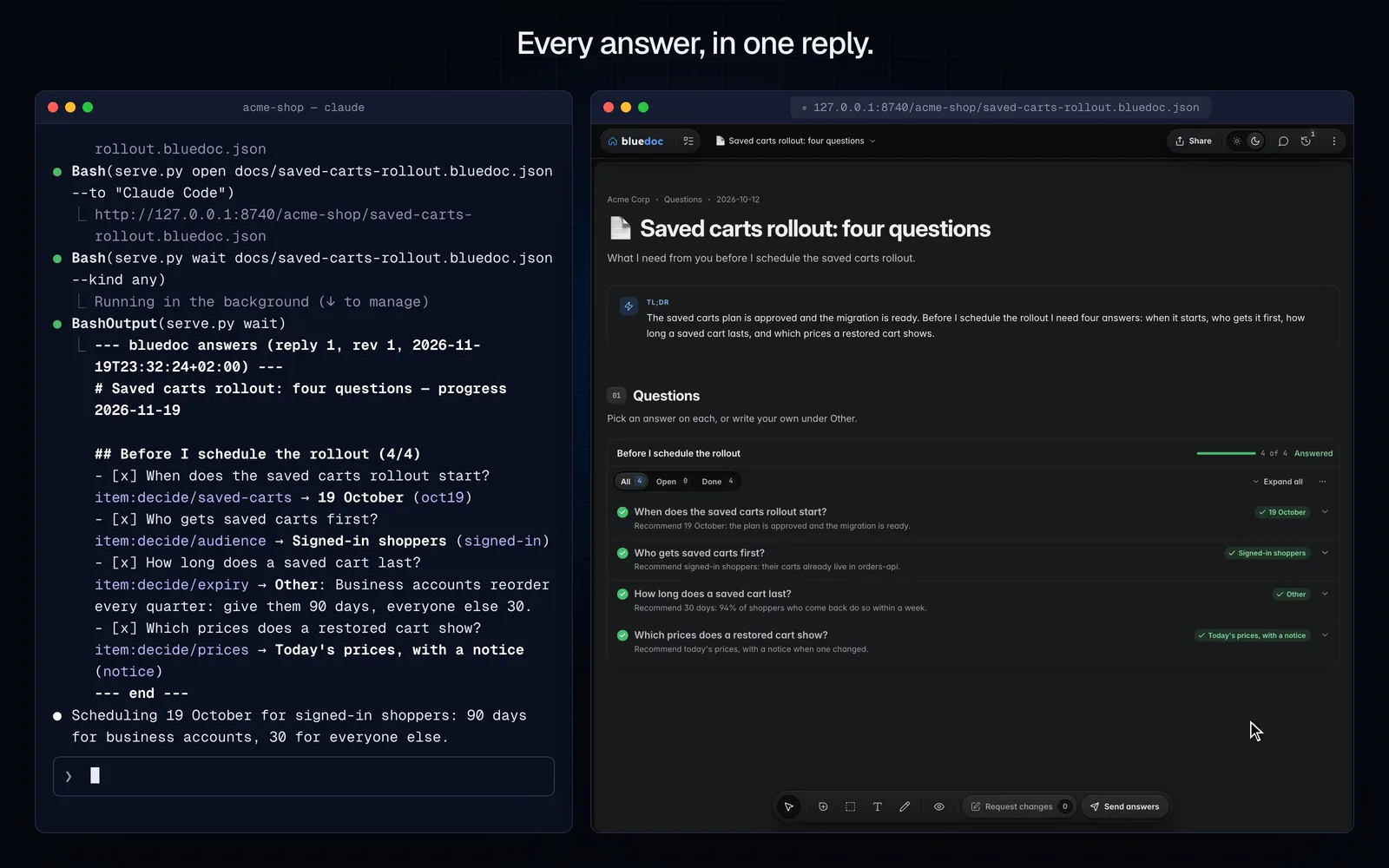
The answer card
Pick one, several, or ask for more.
More details opens the question’s own detail, and picking an answer opens its explanation. Accept recommended takes every starred answer in a list at once.
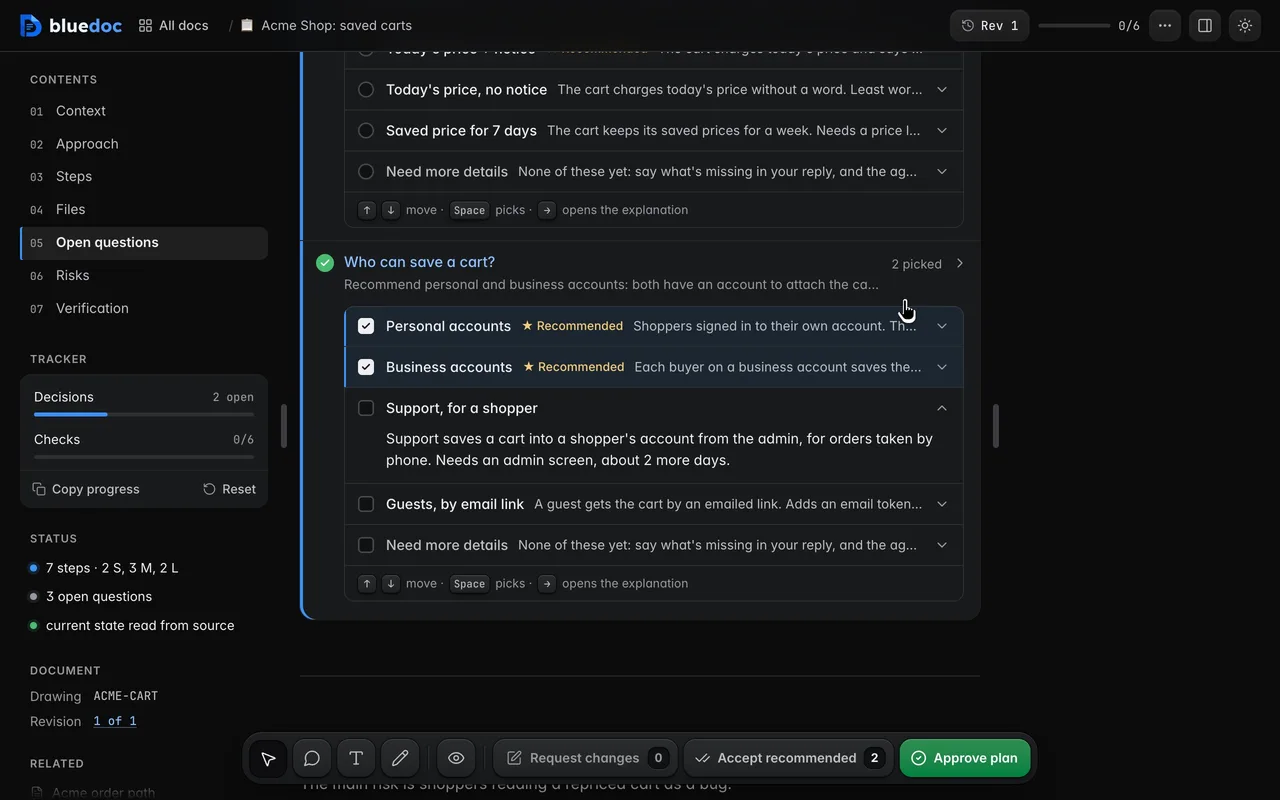
Pick an answer, or several
Each answer is a row with its label, ★ Recommended and one line; picking it opens the full explanation, and More details opens the question’s own. A question can take several answers; Other takes your own words, and Tell me more sits under the answers.
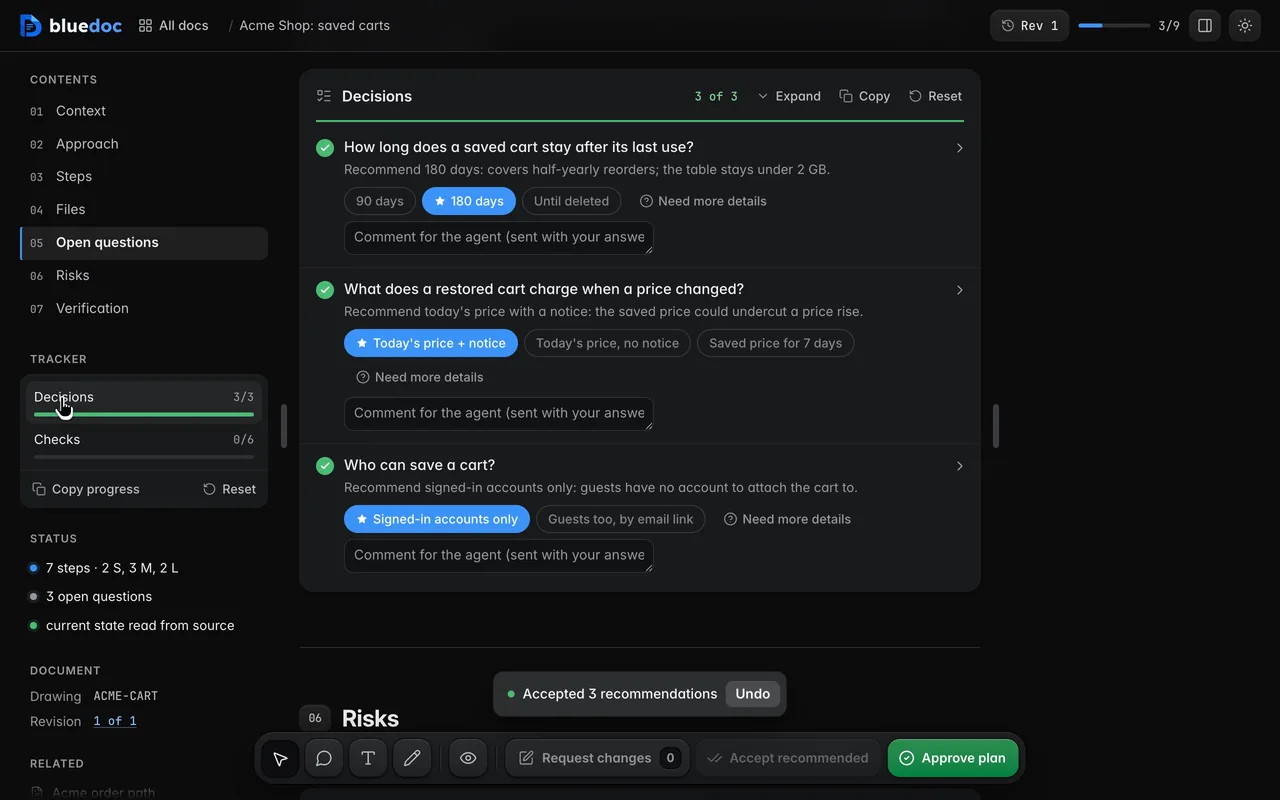
Accept every recommendation at once
Each decision list and findings section has Accept recommended in its toolbar: it picks every starred answer in one go. Change the ones you disagree with afterwards.
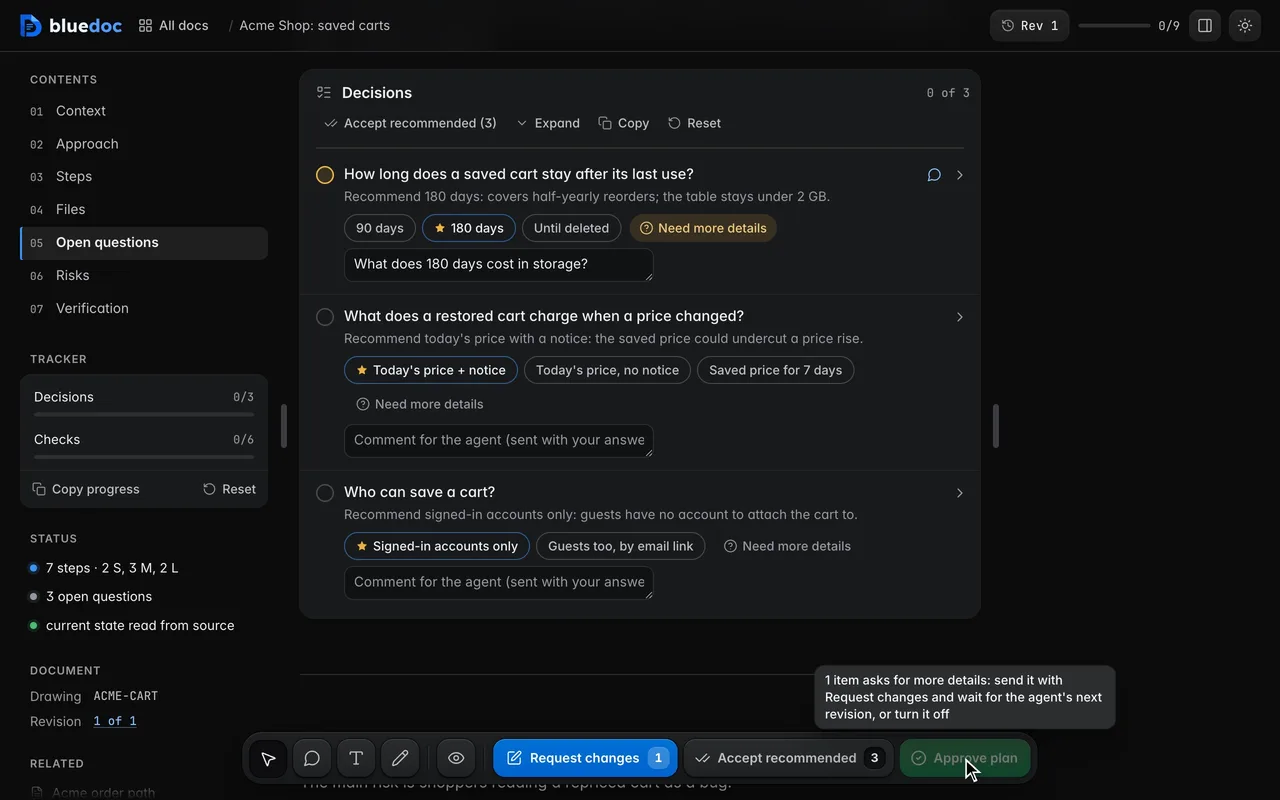
Ask the agent to tell you more
Tell me more, the pill under the answers, asks the agent what is missing before you pick, and moves you to the reply field to say what you need to know.
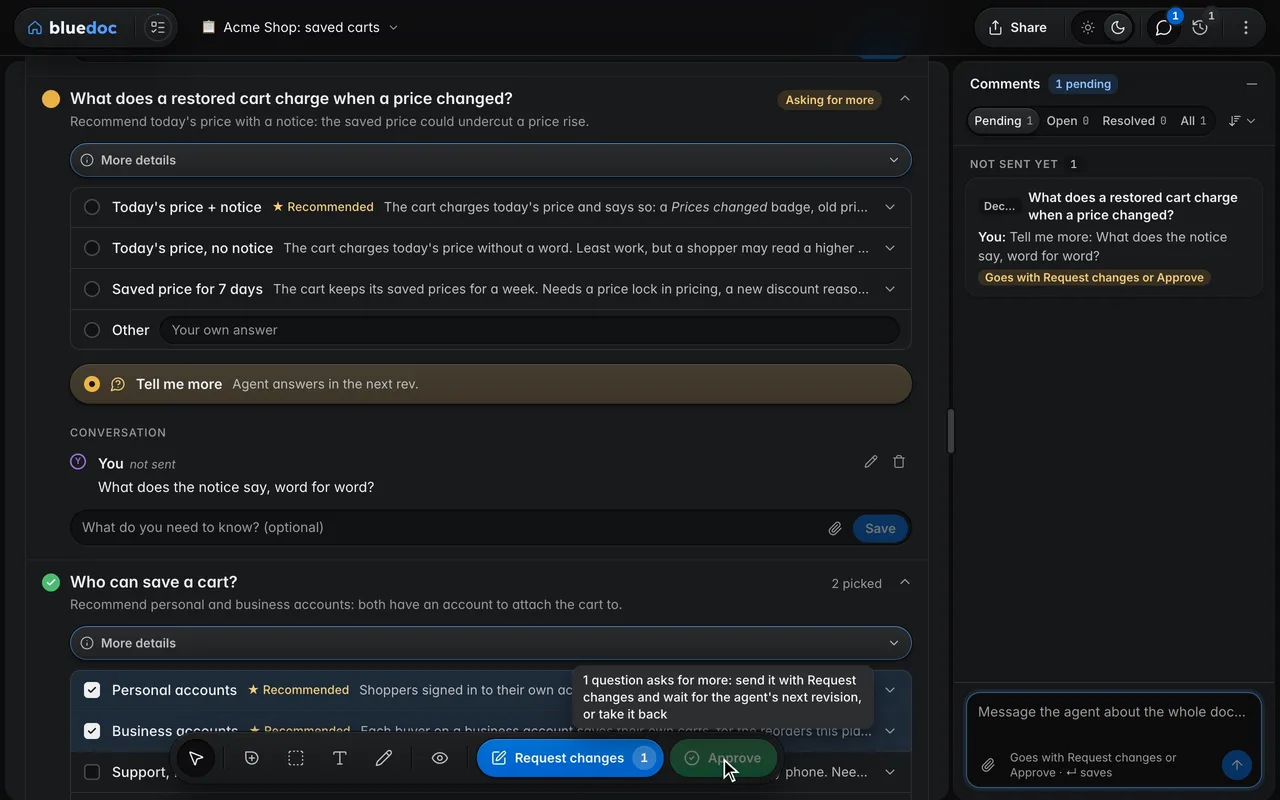
Approve once your questions are answered
While a question asks for more with Tell me more, Approve waits and says why. Send the question with Request changes; when the agent’s next revision answers it, approve.
On every doc type
The same card wherever the agent asks.
A plan’s open questions, a review’s findings, a design’s brief, a website’s versions and a status page’s decision all answer the same way.
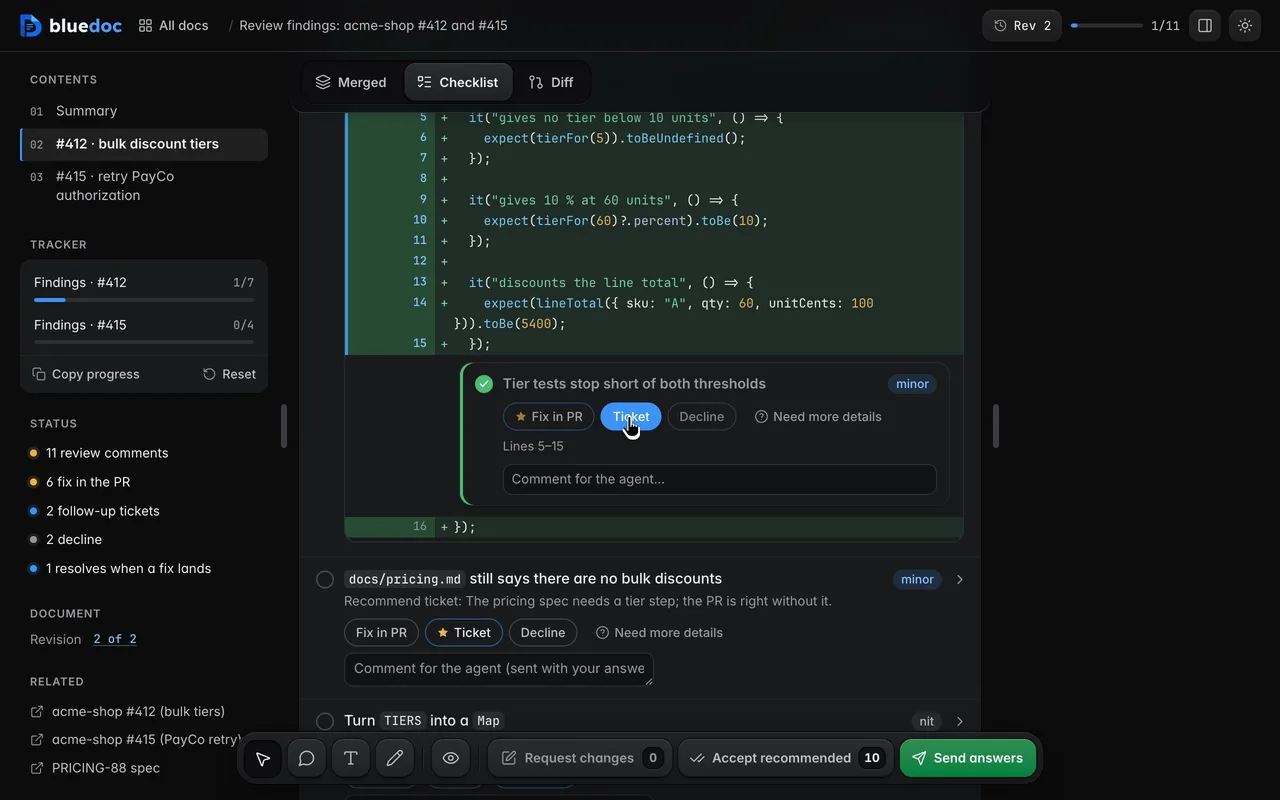
Decide each finding
Each finding has a size, from blocker to nit, and its options: Fix in PR, Ticket, Decline, or the real alternatives. Its head shows your pick, and the toolbar counts what’s done.
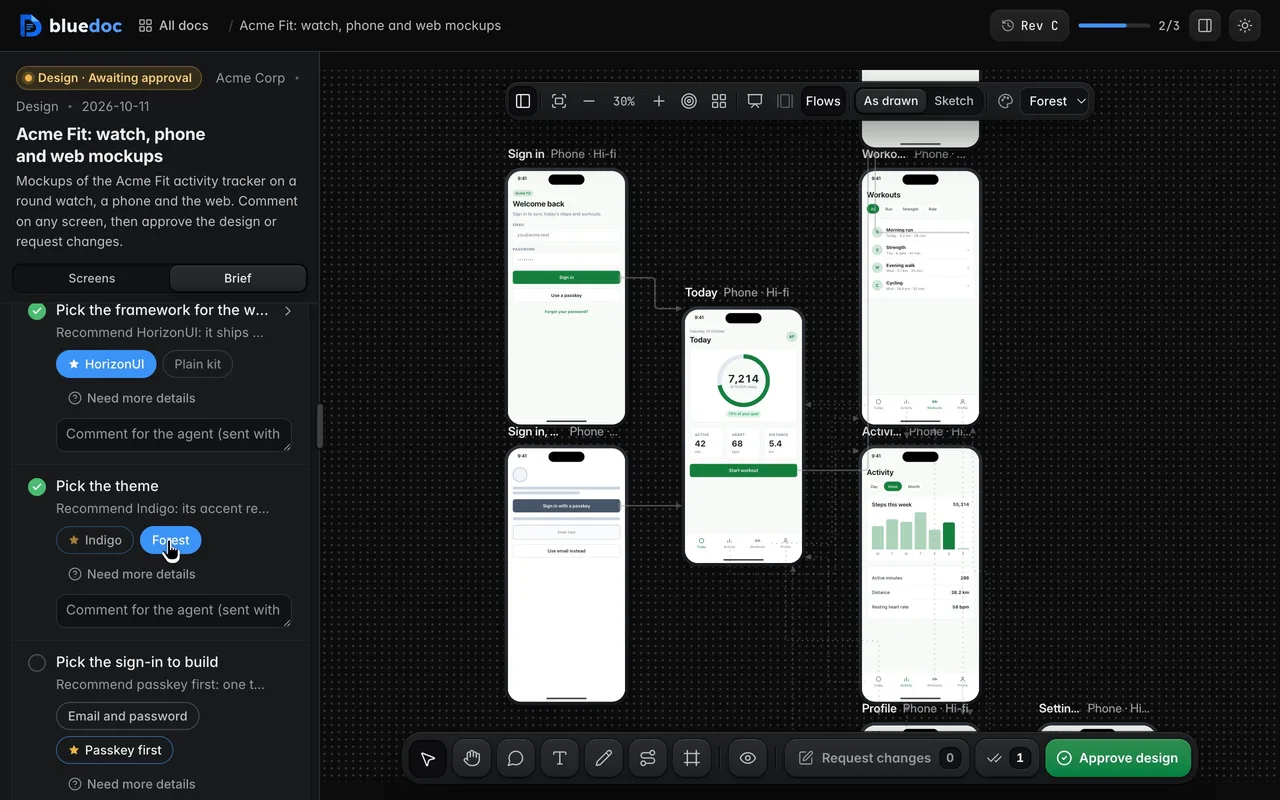
Re-skin every screen with a theme pick
The Brief, in the board’s left pane, lists themes as sets of tokens on an answer card, with Other and Tell me more. Pick one and every screen re-skins at once.
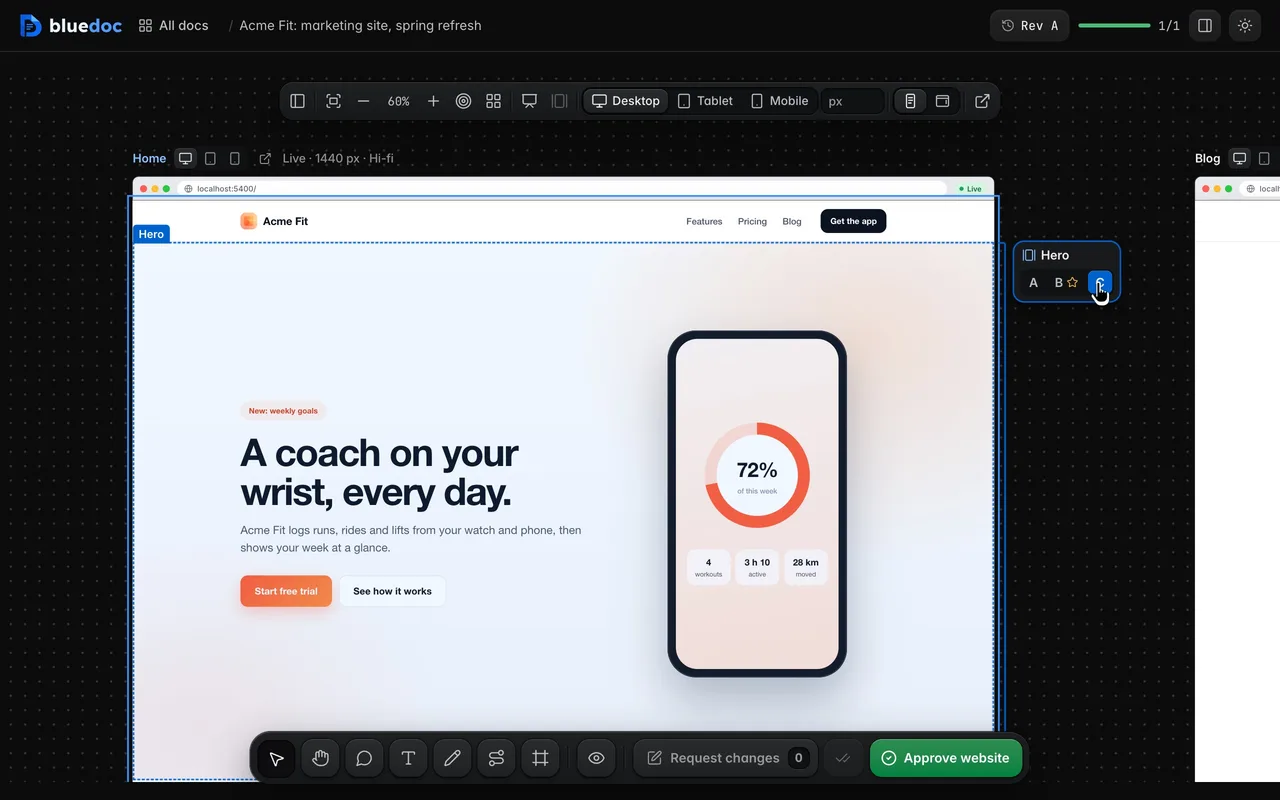
Pick a hero version in place
A section tied to a decision gets A B C keys beside it. Point at one to outline the section, pick it, and the page shows that version.
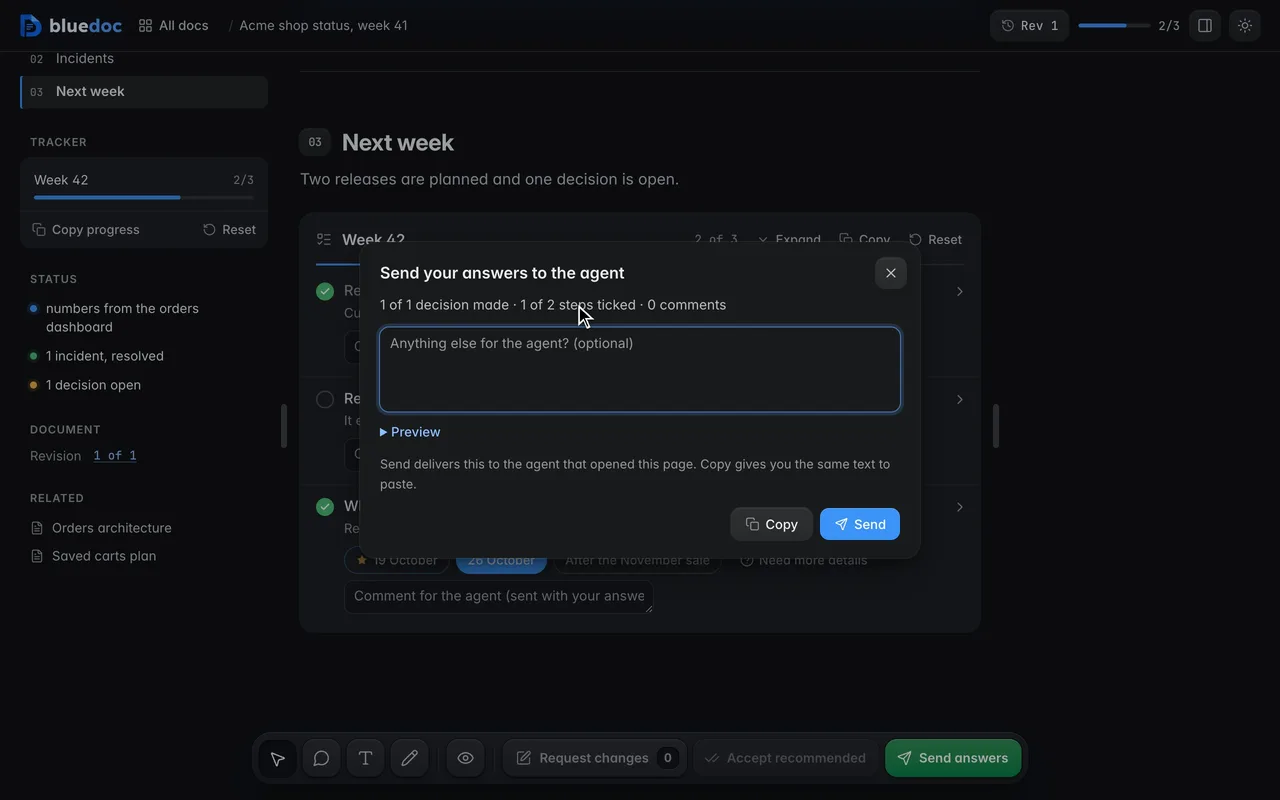
Send ticks and picks without approval
Pages with no approval step, such as a status report, send your ticks, picks and step comments with Send answers. A review’s key names its next step: Apply decisions, Post review or Reply and fix.
One conversation per question
Say why, and read the agent’s reply.
A comment in an answer’s field is about that answer; the reply field is about the whole question. The agent answers in the same conversation, marked with its rev.
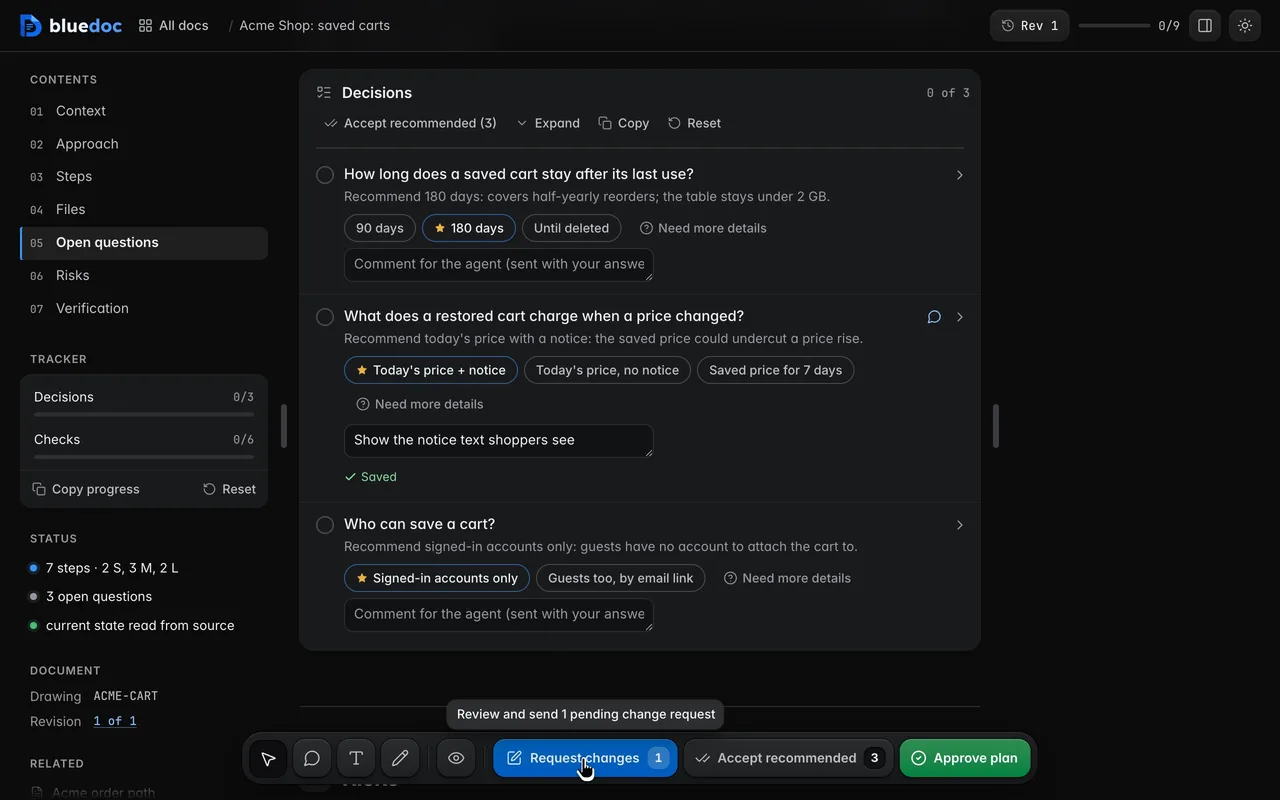
Comment on one item
Each opened answer has a one-line comment field, and each question and step a reply field. Enter or Save keeps the comment: it shows once in the conversation, not sent yet, and Request changes counts it.
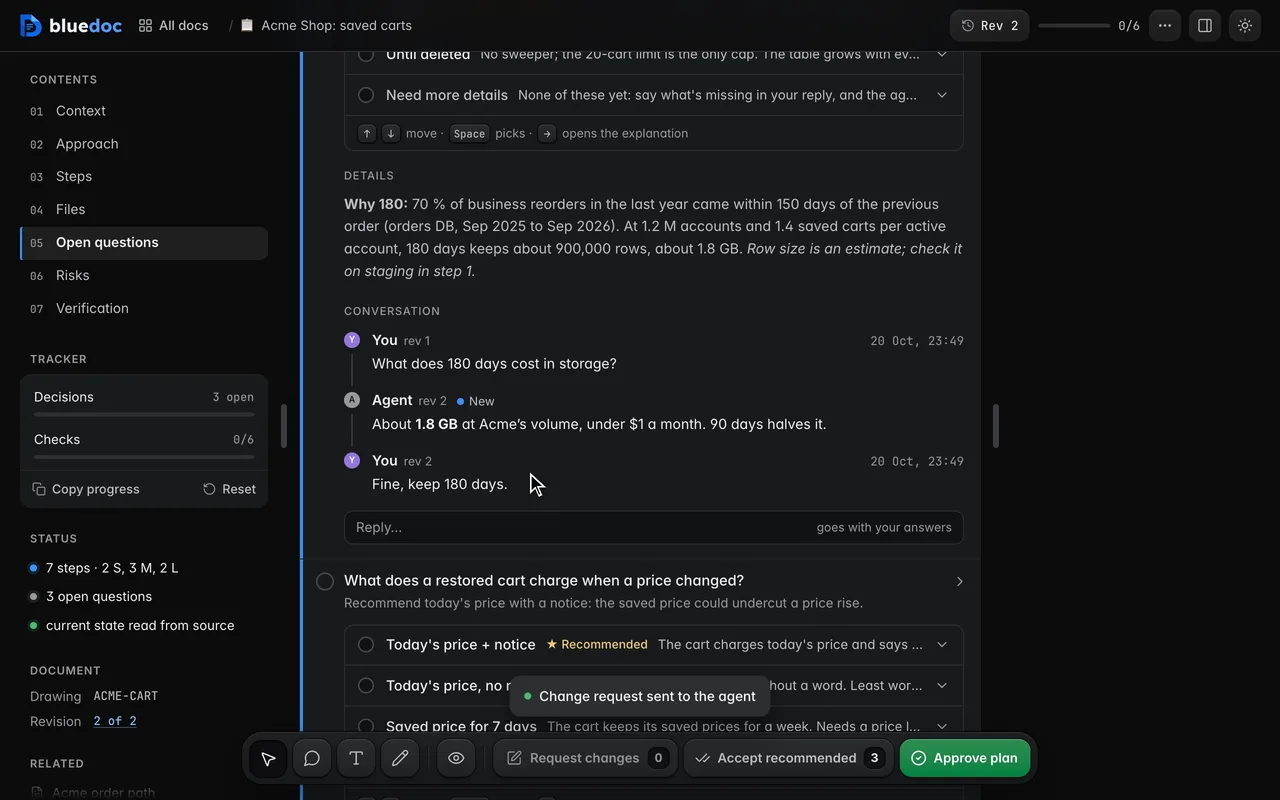
Talk it through with the agent
Each question, pin and general comment is a conversation. A sent comment becomes a message tagged with its rev; the agent’s replies, signed with its model’s name, sit between yours, marked New until you see them.
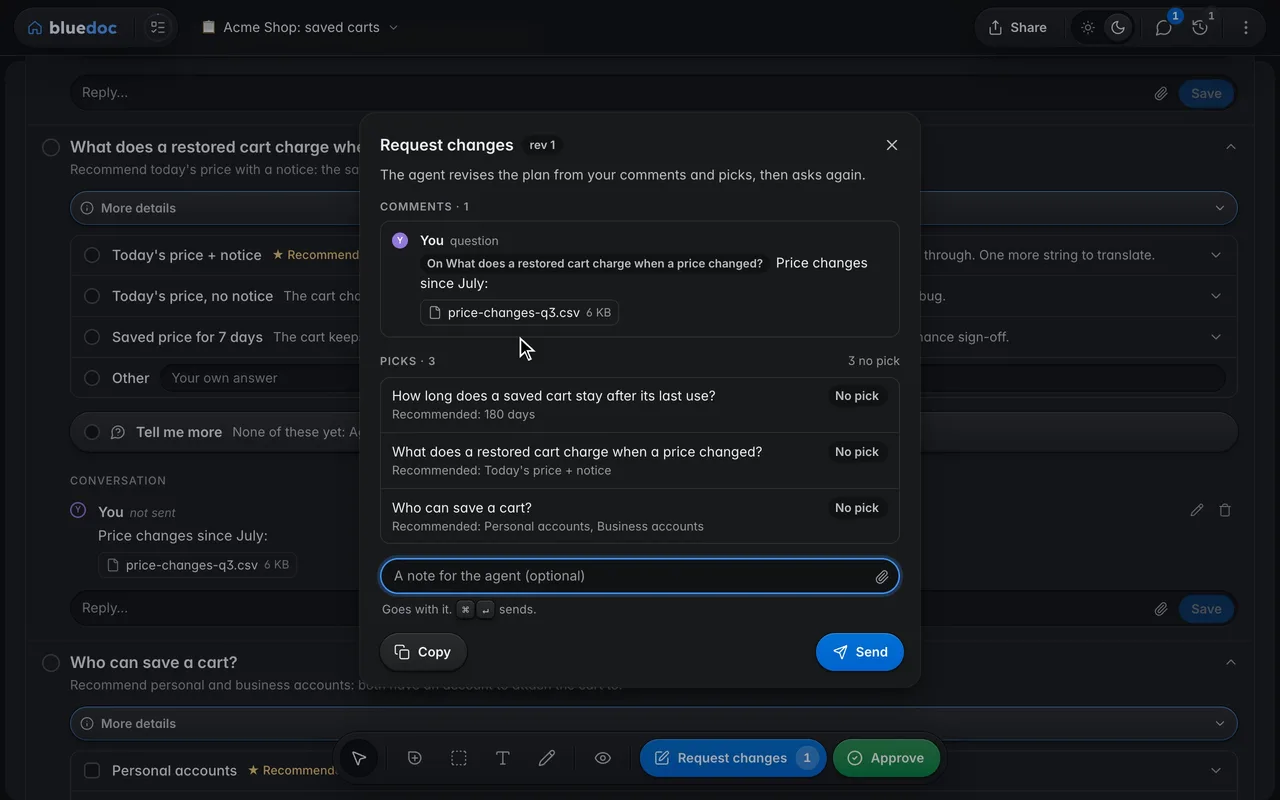
Attach a file to a comment
Every comment field has Attach: pick a file, drop one on the field or paste a screenshot. The server keeps a copy, and your comment gives the agent its full path, so it reads the file itself.
How the agent asks
A question in the JSON.
Your answer back through serve.py wait.
The agent writes each choice it can’t make alone as a question with choices and a recommend. Tell me more comes back with Request changes; the agent answers with --reply and sharpens the answers in its next revision.
python3 <skill>/scripts/serve.py wait docs/plans/saved-carts.bluedoc.json --kind anypython3 <skill>/scripts/build.py patch docs/plans/saved-carts.bluedoc.json item:decisions/prices --reply "The notice flags each line whose price changed since the cart was saved." --change "Said what the price notice shows."{ "id": "retention", "text": "How long does a saved cart stay after its last use?", "sub": "Recommend 180 days: covers half-yearly reorders.", "recommend": "d180", "choices": [ { "id": "d90", "label": "90 days" }, { "id": "d180", "label": "180 days" }, { "id": "forever", "label": "Until deleted" } ]}--- bluedoc change request (reply 3, rev 1, 2026-10-12T10:32:15+00:00) ---# Change requests: Acme Shop: saved carts (rev 1), 2026-10-12 ## Decisions- How long does a saved cart stay after its last use? `item:decisions/retention` → **180 days** (`d180`)- What does a restored cart charge when a price changed? `item:decisions/prices` → **Tell me more** > What does the notice say, and where does it show? Reply: `build.py patch saved-carts.bluedoc.json item:decisions/prices --reply "…"`- Who can save a cart? `item:decisions/guests` → **Personal accounts**, **Business accounts**--- end ---Other comes back in your own words, and the agent treats it as your decision. While a question asks for more, Approve stays grey and says why.
Other features
Six more features, a page each.
- CommentsPin, box, select or draw a comment on any part of the page.
- Send and approveApprove a revision, or send it back with your notes.
- RevisionsEvery revision kept, any two compared side by side.
- Share and exportA view-only bluedoc.ai link, or an HTML, PDF or Markdown file.
- ChartsStat cards, lines, bars and a donut, drawn in the page.
- Home and SettingsEvery doc on one page: search, filters, statistics and Settings.
Answer your agent
on a page.
Pick your agent. Each one installs the same skill from the GitHub repository.
claude plugin marketplace add andreiverdes/bluedocclaude plugin install bluedoc@bluedocInside a session the same commands are /plugin marketplace add andreiverdes/bluedoc and /plugin install bluedoc@bluedoc. Start a new session to load the skill.
codex plugin marketplace add andreiverdes/bluedoccodex plugin add bluedoc@bluedocRestart Codex. Mention the skill with $bluedoc or let Codex pick it from your request. Plan mode (/plan) opens the plan as a page; the README has the sandbox lines that skip the approval prompts.
pi install git:github.com/andreiverdes/bluedocRestart pi. /bluedoc-plan-mode turns on plan mode, and the plan opens as a page for your approval.
omp plugin marketplace add andreiverdes/bluedocomp plugin install bluedoc@bluedocRun /reload-plugins in an open session, or start a new one. omp’s plan reviews open as pages: Approve runs the plan, Request changes refines it.
copilot plugin install andreiverdes/bluedocStart a new session. When Copilot leaves plan mode, its plan opens as a page and waits for your approval.
git clone https://github.com/andreiverdes/bluedoc.gitagy plugin install bluedoc/antigravityRestart agy. In plan mode (agy --mode plan or /plan), the implementation plan opens as a page for your approval.
npx skills add andreiverdes/bluedocFor any other agent that reads skills. Or clone the repository and link skills/bluedoc into your agent’s skills folder.
- Python 3.9 or later on PATH
- git, for code reviews
- gh, only for GitHub review threads and Share